
Как сделать двухколоночную раскладку Flexbox в React Native
Узнайте, как создать двухколоночную раскладку Flexbox в React Native с помощью flex-wrap, с настраиваемым числом колонок и отступами между элементами.
Создание двухколоночной раскладки в React Native для списка элементов — довольно распространённая задача. Такую раскладку из 2 колонок в react native можно легко получить с помощью flex. В примере ниже показано, как добиться двухколоночной раскладки с отступами между элементами.
Вот наш view:
<View style={styles.container}>
    <View style={styles.itemContainer}><View style={styles.item}><Text>{'item1'}</Text></View></View>
    <View style={styles.itemContainer}><View style={styles.item}><Text>{'item2'}</Text></View></View>
    <View style={styles.itemContainer}><View style={styles.item}><Text>{'item3'}</Text></View></View>
    <View style={styles.itemContainer}><View style={styles.item}><Text>{'item4'}</Text></View></View>
    <View style={styles.itemContainer}><View style={styles.item}><Text>{'item5'}</Text></View></View>
    <View style={styles.itemContainer}><View style={styles.item}><Text>{'item6'}</Text></View></View>
    <View style={styles.itemContainer}><View style={styles.item}><Text>{'item7'}</Text></View></View>

</View>
А вот наши стили:
const styles = StyleSheet.create({
  container: {
    flex: 1,
    flexDirection: 'row',
    flexWrap: 'wrap',
    alignContent: 'flex-start'
  },
  itemContainer: {
    width: '50%', // 50% -> 2 columns | 33% -> 3 columns | 25% -> 4 columns
    height: '100px'
  },
  item: {
    padding: '8px',
    margin: '8px',
    backgroundColor: '#EEEEEE',
    height: "calc(100% - 8px)"
  }
})
Результат выглядит так:
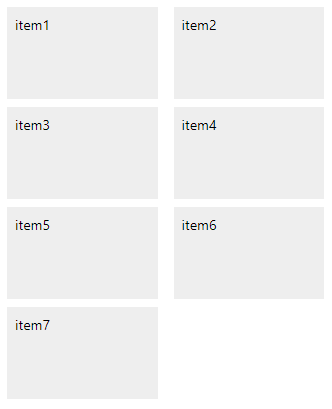
Чтобы изменить количество колонок, достаточно поменять свойство width у itemContainer. 50% даст 2 колонки, 33% — 3 колонки, 25% — 4 колонки, 20% — 5 колонок и так далее.
Comments
Sign in with GitHub to comment. Reactions and replies thread back to the comments repo.