
WPF OpenFileDialog のフォルダーツリーを特定のフォルダーに限定する
.NET 8 の RootDirectory プロパティを使って、WPF OpenFileDialog のフォルダーツリーを特定のルートフォルダーに限定する方法を解説します。
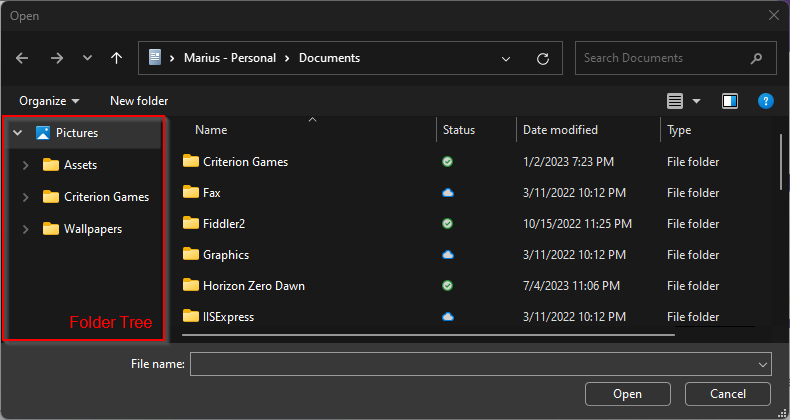
.NET 8 から、OpenFileDialog と OpenFolderDialog のフォルダーツリーを、指定したルートフォルダーに制限できるようになりました。ShowDialog() を呼び出す前に、ダイアログの RootDirectory プロパティを設定するだけです。
ここで重要なのは、これによって選択やアドレスバーからのナビゲーションが制限されるわけではないという点です。ユーザーは、指定した RootDirectory の外のフォルダーにも引き続き移動できます。InitialDirectory プロパティについても同じで、RootDirectory の外のフォルダーを自由に指定できます。
例を見てみましょう。
var dialog = new OpenFileDialog
{
    InitialDirectory = Environment.GetFolderPath(Environment.SpecialFolder.MyDocuments),
    RootDirectory = Environment.GetFolderPath(Environment.SpecialFolder.MyPictures),
};

dialog.ShowDialog();これにより、MyDocuments フォルダーを開いた状態のファイルダイアログが表示されますが、左側のフォルダーツリーは指定したルートディレクトリ、ここでは MyPictures にスコープが限定されます。
Comments
Sign in with GitHub to comment. Reactions and replies thread back to the comments repo.