Lighthouse report: Properly size images
Improve your Lighthouse performance score by properly sizing and optimizing images for the web using tools like Squoosh.
Properly sizing your images can improve your page loading times drastically. Here we’re looking at two distinct categories:
- images which are not optimized for the web (uncompressed, bad formats)
- images at a resolution higher than what’s needed (i.e. when you have a 800px-width image displayed as 300px)
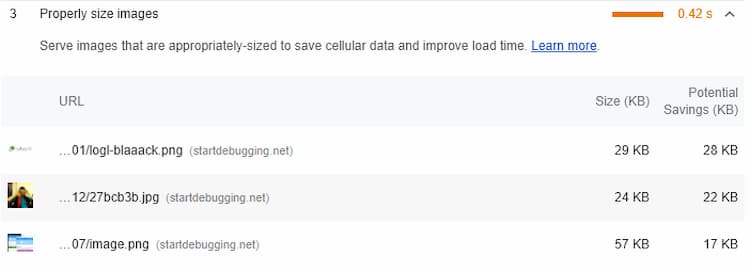
In our case we have three images on the front page not optimized or improperly sized. For optimizing them I will use Squoosh.
First image – the Outworld Apps logo: it had 887px in width and was being displayed in a container which is 263px wide. Resized and optimized it using OptiPNG and its size dropped from 29.2 KB to 9.13 KB.
Second image – that’s an image of me. 200px by 200px displayed in a 86px container. Resizing + optimization led to a 76% smaller image.
Last one – it’s an image from one of the articles. Here it’s important to know the width of your posts container. For my blog that is 523px. The image is already that size but I had copy pasted it from the snipping tool so it’s not optimized at all + it’s a PNG when I really don’t care about transparency in this case so it could just as well be a JPEG.
Update the images & we’re done.