What is the difference between a MegaByte (MB) and a MebiByte (MiB)?
Learn the difference between megabytes (MB) and mebibytes (MiB), why 1 MB equals 1000 KB (not 1024), and how different operating systems handle these units.
If you were taught that 1 MB = 1024 KB, you were taught wrong. 1 MB actually equals 1000 KB, while 1 MiB = 1024 KiB. The mebi prefix in MebiByte (MiB) stands for mega and binary – which refers to it as being a power of 2 – thus the values such as 32, 64, 128, 256, 512, 1024, 2048 and so on.
The megabyte (MB) on the other hand is always a power of 10, so you’ve got 1 KB = 1000 bytes, 1 MB = 1000 KB and 1 GB = 1000 MB.
Differences between Operating Systems
Almost each operating system deals with these units differently, and out of all of them, Windows is the most unusual. It actually calculates everything in mebibytes but then adds a KB/MB/GB at the end, basically saying it’s a megabyte. So a 1024 byte file will be reported as 1.00 KB, while in reality it is 1.00 KiB or 1.024 KB.
You can test this yourself by creating a TXT file with 1000 characters in it (1 character = 1 byte), and then inspecting the file info.
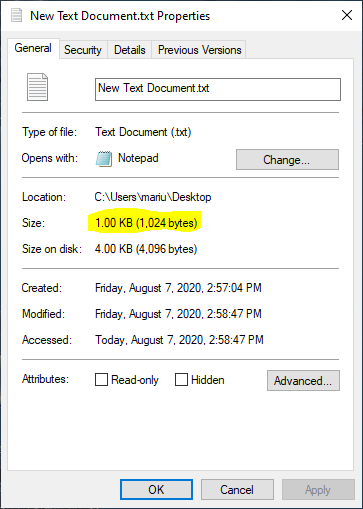
Windows reporting 1024 bytes as 1 KB instead of 1 KiB or 1.024 KB
This kind of reporting leads to all kinds of confusion, with users often feeling ripped off when they buy a 256 GB hard-drive, only to have it reported by Windows as 238 GB (when what they mean is 238 GiB, which equals 256 GB).
Other operating systems that use this power of 10 definition include macOS, iOS, Ubuntu, and Debian. This way of measuring memory is also consistent with the other uses of the SI prefixes in computing, such as CPU clock speeds or measures of performance.
Note: macOS measured memory in powers of 2 units prior to Mac OS X 10.6 Snow Leopard, when Apple switched to units based on powers of 10. The same applies starting with iOS 11.
Dealing with conflicting definitions
The mebibyte was designed to replace the megabyte as it conflicted with the definition of the prefix mega in the International System of Units (SI). But despite being established by the International Electrotechnical Commission (IEC) in 1998 and accepted by all major standards organizations, it is not widely acknowledged within the industry or media.
The IEC prefixes are part of the International System of Quantities – and IEC has further specified that the kilobyte should only be used to refer to 1000 bytes. This is the current modern standard definition for the kilobyte.
Comparison of decimal and binary units
In the end, I leave you with a table containing all the different names of the different units of measure, multiples of bytes. One thing to note here is that the ronna- and quetta- prefixes were adopted recently — in 2022 — by the International Bureau of Weights and Measures (BIPM), but only for the powers of 10 units. The binary counterparts were given in a consultation paper but they have not been adopted yet by either IEC or ISO.
| Decimal Value | Metric | Binary Value | IEC | Memory |
|---|---|---|---|---|
| 1 | B byte | 1 | B byte | B byte |
| 1000 | kB kilobyte | 1024 | KiB kibibyte | kB kilobyte |
| 1000^2 | MB megabyte | 1024^2 | MiB mebibyte | MB megabyte |
| 1000^3 | GB gigabyte | 1024^3 | GiB gibibyte | GB gigabyte |
| 1000^4 | TB terabyte | 1024^4 | TiB tebibyte | TB terabyte |
| 1000^5 | PB petabyte | 1024^5 | PiB pebibyte | |
| 1000^6 | EB exabyte | 1024^6 | EiB exbibyte | |
| 1000^7 | ZB zettabyte | 1024^7 | ZiB zebibyte | |
| 1000^8 | YB yottabyte | 1024^8 | YiB yobibyte | |
| 1000^9 | RB ronnabyte | |||
| 1000^10 | QB quettabyte |
Multiples of bytes in Decimal and Binary