Xamarin Startup Tracing for Android
Improve your Xamarin Android app startup time by up to 48% using startup tracing, which AOT-compiles only the code needed at launch.
Your app’s startup time matters because it’s the first impression that the user gets to make about its performance. It doesn’t matter what you promise me if it takes 10 seconds to load the app each time I try and use it. I might even uninstall it thinking it doesn’t actually work. And with Xamarin Android this has been a hot topic over time. Now the team decided to tackle the problem a bit more aggressively by introducing startup tracing.
What is startup tracing?
It basically means that part of your assemblies will be compiled ahead of time (AOT) instead of just in time (JIT) thus reducing overhead when executing code but increasing APK size.
In particular, startup tracing will AOT only the things required by your app at startup based on a custom profile of your app. This means that the APK increase will be minimal while its impact is maximized.
Some numbers shared by the Xamarin team:
| Type | Startup time | APK size |
|---|---|---|
| Normal | 2914 ms | 16.1 MB |
| AOT | 1180 ms (-59%) | 34.6 MB (+115%) |
| Startup Tracing | 1518 ms (-48%) | 20.1 MB (+25%) |
Enabling startup tracing
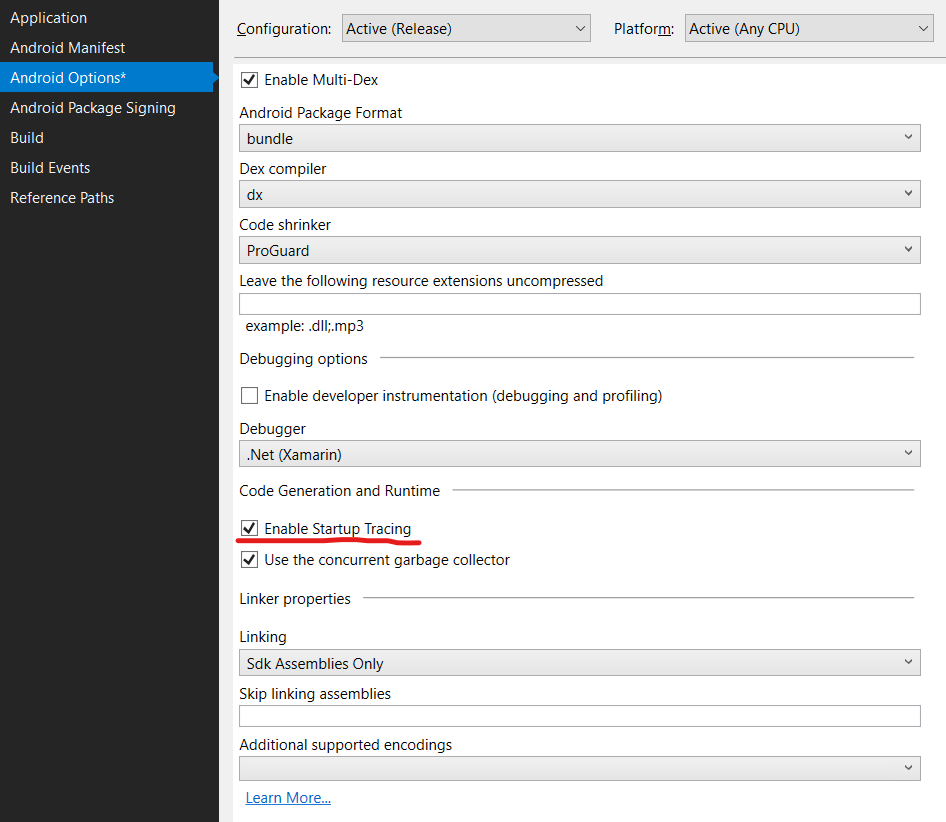
Enabling it is simple: just go to your Xamarin Android project settings (right-click > Properties) and tick “Enable Startup Tracing” under “Code Generation and Runtime” as shown in the image below.